Security Features
In this section, we'll introduce some basic security features on KaiOS platform.
Trusted boot mechanism
Secure chain is: ROM -> Bootloader ->fdl -> uBoot-> Kernel -> System. Root of trust is based on hardware SoC ROM + eFuse:
- Bootloader is stored inside ROM, programmed in chipset vendor factory, cannot be modified by anybody. When phone is powered up, Bootloader will be executed first.
- Bootloader will read eFuse public key Hash, and validate fdl bin signature, load and execute fdl bin .
- Fdl will validate U-Boot signature, load and execute uBoot bin.
- uBoot will validate kernel signature, load and execute kernel bin.
- Kernel will use dm-verity to validate system, vendor partition, load and execute system bin. OEM/ODM generate private/public key pair and use this key pair to sign software build and also do eFuse process to store public key hash in eFuse and lock eFuse (can not modify anymore). Platform also support anti-rollback function which can forbid flashing old firmware version into device.
Memory isolation and access control
Different application is running in different Linux process. OS supports standard memory isolation and access controls:
Virtual Memory: Each process has its own virtual memory space and uses standard Linux kernel features and hardware MMU for memory isolation between different process. One process cannot directly access or corrupt another process data through any memory read/write operations. A crash in process does not affect others.
- MMU (Memory Management Unit) supported by CPU.
- Linux kernel manage mapping table for each process and do the maps for the virtual address used by the process to the physical address where the data actually resides.
DAC: Different process had different UID/GID and OS has standard Linux DAC(Discretionary Access Control) for resource access based on UID/GID.
SELinux: SElinux(Security-Enhanced Linux) is supported and Selinux policy is defined for resource access control.
Seccomp: Seccommp-BPF (SECure COMPuting with Berkeley Packet Filter) define filter rules that specify which system calls are allowed, which are defined and how the kernel should response to restricted system call attempt. For Web Apps, OS has below security access controls:
Application isolation and sandbox
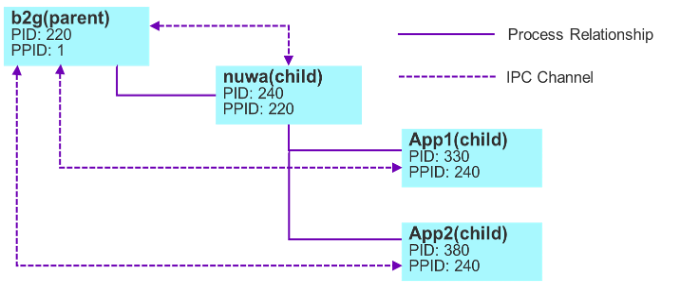
- Application are running in different process with restricted OS privileges using secomp-bpf and sepolicy.
- B2G (Gecko) runs in a highly-privileged system process that has access to hardware features.
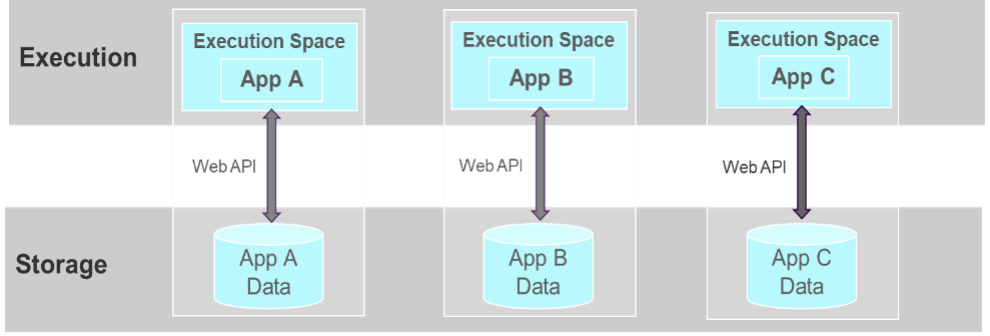
- Privileged access is provided through web APIs, which are mediated by the B2G process.
- KaiOS sandbox is based on Mozilla sandbox solution.
- Application doesn’t share Cookies/Permission/LocalStorage with other application, follow same-origin policy protection.
- Application can’t launch other applications directly.
Applications have different types for Web API access, detail permissions can be allowed in different types of Apps can be found here: App Permissions | KaiOS, Enable tomorrow.
| Type | Description |
|---|---|
| Certified |
|
| Privileged |
|
| Web |
|
non pre-built applications (signed)
KaiOS phone can only download applications from Kai Store. Only KaiOS can publish applications on Kai store. Applications will be signed by Kai signing key in Kai backend and device OS framework will do application signature check before installation. In OS version 2.6, framework will also do integrity check when launching applications each time. Side loading application is not supported for commercial build. OS framework provides API for application to check if store has new version or not. Application can define strategy if old version is forbidden to use or not.
Disable screenshot and overlay
Application can define secure-display permission in manifest to disable screenshot, activity and notificationDialog for whole application as below in application manifest file:
"permissions": {
     "secure-display": {},
     ...
When user press shortcut key *# to do screenshot,
- if screenshot is allowed, it will show “screenshot save to …” message when screenshot is done.
- If screenshot is not allowed, it will show error messages or no do not have any error messages.
With this secure-display permissions, application can not call any activities, and also does not have system level notification Dialog above application so it is not possible to has any overlay screen. For COTS device, OS has to show incoming call screen when we have incoming call. For this case:
- Previous foreground application will run in background and application will receive “visibility change” event.
- Application can do proper action (for example cancel current transaction).
NFC API and NFC access lock
OS provide two different NFC API sets:
- Web NFC API: UI App can use this Web NFC API to do NFC operation.
- PCSC lite API: Daemon/Native can use this API through GeckoBridge to do NFC operation directly without any data go through UI App (Javascript/H5) code/process. As all NFC APDU data go through only native code and it can provide more.
OS provide NFC access exclusive method and security protection:
- nfc_lock(): Lock NFC access which means just this application can access exclusively.
- nfc_unlock: Release exclusive access lock so that all application can use NFC.
- The API can only be used by Daemon/Native code through GeckoBridge API and must be used for security control.
- APDU result will do E2E (End 2 End protection) between NFC daemon process and calling native App.
Disable camera
OS provide API to enable and disable camera so that camera can not be used for some specific user case:
- disable_camera(): Camera feature is disabled and no application can use camera.
- enable_camera(): Camera feature is enabled and application can use camera. The initiator of this API must be the same app as the disabled camera initiator, otherwise we will reject the enable_camera call.
- This API can only be used by Daemon/Native code through GeckoBridge API.
Kai FOTA
KaiOS provide full solution include device side and backend side. OEM can only use KaiOS FOTA service if no special approval. OEM software build is signed by OEM build private key. Only OEM can build new version and generate diff package for device to do OTA upgrade. Device and FOTA backend use secure channel (TLS V1.2 or above).
As explained in secure boot chapter, secure boot process will check signing. If signing is not ok, device can not power on normally. When anti-rollback is enabled:
- FOTA upgrade cannot be done from current version to old version.
- It is not possible to use PC flash tools to flash old version in device too.
- App native code can access anti-rollback status.
KeyStore
Keystore is based on hardware eSE. If eSE is not available, Keystore API will fail.
- Rely on keymint applet inside eSE
- Using UID to control owner
- Selinux control
Provide different functions (API):
- Secure storage,
- Key (RSA, ECC, AES) generation
- Encryption/Signing operation
- Random generation from eSE
Native UI
OS provides a native UI Layer that bridges the Gecko (B2G process) rendering system with a native API available to privileged processes (e.g., the Payment Daemon). This layer provides controlled access to display rendering, input handling, and drawing primitives via a set of public C APIs. This API can only be accessed by Native/Daemon(Rust/C) code, can not be accessed by UI(Javascript/H5) code.
The native UI layer is top layer of the all screen.
- No overlay for this screen.
- No possible to do screenshot and will also no error message to show that screenshot fail.
- Keypad event and touch event will just pass to calling app (native/Daemon app) except “back” and “end key” to system app so that system app can still have way to handle to kill current application in case some abnormal happen.
For graphic part:
- This native UI layer is top layer above all other layer so that this layer can not be overlay by any others.
- The Native/Daemon process communicate with Gecko graphic modules through binder.
- The Native/Daemon process use those public C APIs to render screen contents directly in its process.
- Hardware Composer (HWC HAL) do final display composition to composer this top layer with all other framebuffer layers (which is below to top layer).
For input part:
- Gecko input module communicates with Native/Daemon process through binder.
- Gecko input module receives touch and key event from Linux kernel/EventHub and directly invoke onInputEvent() in Native/Daemon process.
- Key and touch event will not pass to other process and application except “Back” and “End” key to system application Detail for KaiOS native UI can be found in “KaiOS Native UI document”.
Secure patch level
OS provide baseline version, API version and secure patch level information.
For KaiOS v2.6:
- Baseline version: 2.6
- API version: 26
- Secure patch version: 1031 (current latest one)
Kai store
KaiOS provide full solution for store service. Only Kai store is available and device can only download App from Kai store. Only KaiOS side can approve and publish app in Kai store. Apps in the store will be signed by KaiOS self-signed key. Device side will validate signature when device try to install new application or upgrade existing applications. Side loading is forbidden in device user build (commercial release).
Safeguard
Device attestation information (IMEI, model, SerialNumber…) will be stored inside eSE in factory process and will do provision lock.
Device provide safety check API (root, debug, emulator…) and do safety check during power on.
Native application can use the API to detect if device is in the safe or not.
Developer mode is disable in user build (commercial release).